Introduction
Have you ever wondered how your wireless headphones connect to your smartphone without a cable? How does a smartwatch receive information from your phone, or how can a wireless keyboard send your keystrokes to a computer? The answer lies in Bluetooth technology, a wireless communication system that uses the principles of physics to transfer information between electronic devices.
Physics based technology Bluetooth combines electromagnetic waves, electrical circuits, digital signals, and radio communication to make short-range wireless connections possible. It allows compatible devices to exchange information without requiring a physical cable between them.
From smartphones and wireless speakers to smartwatches, keyboards, and fitness trackers, Bluetooth has become an essential part of modern life. Understanding the physics behind this technology helps us discover how electronic devices communicate and why wireless connections work the way they do.
In this article, we will explore how Bluetooth works, the role of electromagnetic waves, frequency hopping, Bluetooth Low Energy, and seven amazing facts about this everyday technology.
What Is Bluetooth Technology?
Bluetooth is a short-range wireless communication technology that allows compatible electronic devices to exchange data using radio waves.
Unlike a wired connection, Bluetooth does not require a physical cable to carry information between devices. Instead, a Bluetooth transmitter converts digital information into a radio signal and sends it through the surrounding environment. A receiving device detects that signal and converts the information back into a usable digital form.
For example, when you connect Bluetooth headphones to a smartphone, the phone transmits digital audio information wirelessly. The headphones receive and process that information, and their internal electronic circuits convert it into sound.
Bluetooth operates in the 2.4 GHz Industrial, Scientific, and Medical (ISM) radio band. This band is used by several wireless technologies, including Wi-Fi and other radio-frequency devices.
Bluetooth is designed primarily for short-range communication, although the actual distance depends on the device, radio power, antenna design, obstacles, and surrounding interference.
How Does Physics Based Technology Bluetooth Work?
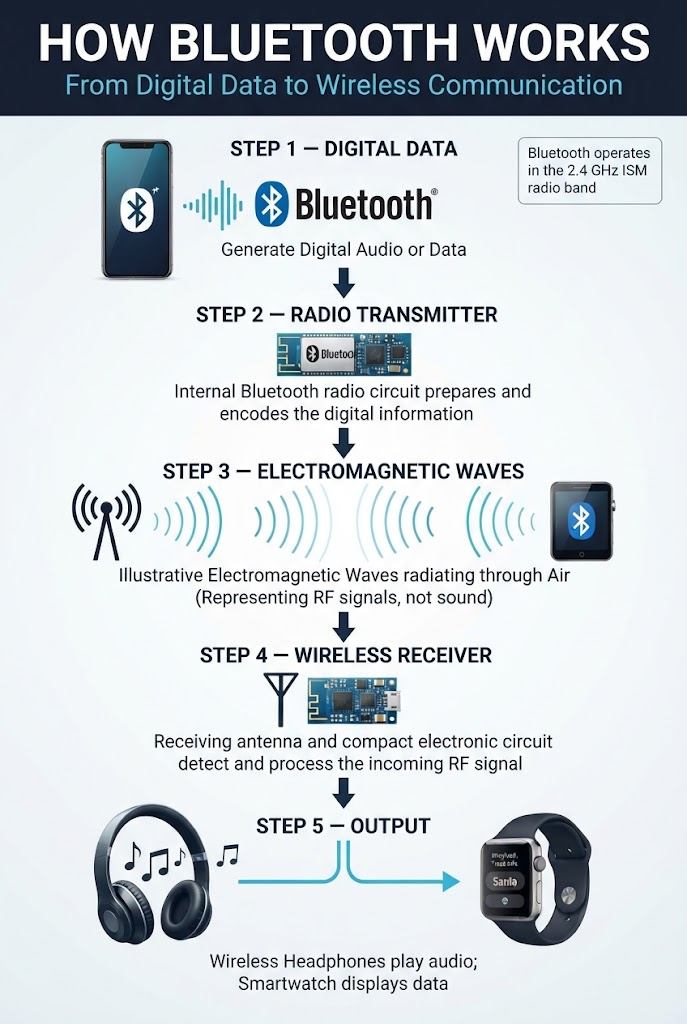
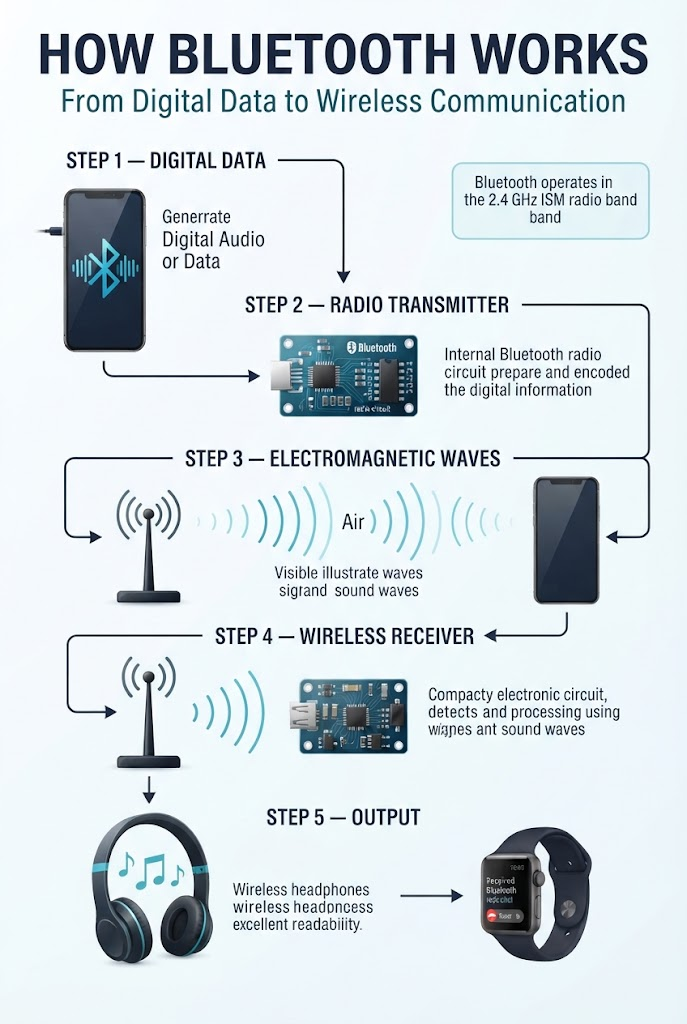
The working principle of Bluetooth involves several connected physical and electronic processes. These processes allow information to travel between devices without a direct electrical cable.
1. Digital Data Is Prepared for Transmission
Everything sent through Bluetooth begins as digital information.
A smartphone may need to transmit music, a keyboard may need to send a keypress, or a smartwatch may need to exchange health and activity data with another device.
The device’s electronic circuits organize the information into data packets. Depending on the Bluetooth technology and application, these packets contain the information needed to transmit and interpret the data.
2. Electrical Signals Become Radio Waves
Inside a Bluetooth device, an electronic transmitter generates radio-frequency signals.
The transmitter uses an oscillator and other radio-frequency circuits to produce signals at the required frequencies. Modulation techniques then encode information onto those signals.
An antenna converts the electrical radio-frequency signal into an electromagnetic wave that travels through space.
This is one of the most important physics principles behind Bluetooth: electromagnetic energy can carry information from one device to another without a physical wire connecting them.
3. Radio Waves Travel Through the Environment
Once transmitted, Bluetooth radio waves travel through the surrounding environment at approximately the speed of light.
However, the signal does not always travel directly from the transmitter to the receiver. Walls, furniture, metal objects, and even the human body can weaken, reflect, or obstruct radio signals.
This explains why a Bluetooth connection may work well in an open room but become less reliable when the devices are separated by thick walls or other obstacles.
4. The Receiving Device Detects the Signal
The receiving device uses its antenna to detect the incoming radio-frequency signal.
Its receiver circuits amplify and process the signal, recover the transmitted data, and check whether the received information is valid.
After the data has been decoded, the device’s software determines what to do with it.
For example, a Bluetooth speaker processes received audio data and sends it to its audio-processing circuits. The speaker’s amplifier and driver then convert electrical signals into sound waves.
5. Devices Exchange Information Wirelessly
Bluetooth devices use defined communication procedures to discover compatible devices, establish connections when required, and exchange information.
Once connected, the devices follow the relevant Bluetooth communication rules to transmit and receive data.
The entire process happens quickly enough that users can listen to music, type on a wireless keyboard, or receive notifications without manually handling each data packet.
The Physics Behind Bluetooth Technology
To understand physics based technology Bluetooth, we need to explore the scientific principles that make wireless communication possible.
1. Electromagnetic Waves
Bluetooth uses electromagnetic waves to transfer information through space.
An electromagnetic wave consists of changing electric and magnetic fields that propagate together. Unlike sound waves, electromagnetic waves do not require air or another material medium to travel.
Bluetooth signals are radio waves, which are part of the electromagnetic spectrum.
Because these waves can travel through the air, Bluetooth devices can communicate without touching each other.
The frequency of a radio wave determines how rapidly its electromagnetic fields oscillate. Bluetooth operates in the 2.4 GHz band, meaning its radio signals have frequencies around 2.4 billion cycles per second.
This does not mean Bluetooth transmits 2.4 billion separate messages every second. Frequency describes the oscillation of the radio wave, while data transmission depends on how information is encoded onto the signal.
2. Frequency and Wavelength
Frequency and wavelength are connected through the relationship:
Wavelength = Speed of Light ÷ Frequency
The mathematical formula is:
λ = c ÷ f
Where:
- λ = wavelength
- c = speed of light, approximately 3 × 10⁸ metres per second
- f = frequency
For a radio wave with a frequency of 2.4 GHz, the wavelength is approximately 0.125 metres, or 12.5 centimetres.
This relatively short wavelength makes it practical to design compact antennas for smartphones, headphones, smartwatches, and other portable electronic devices.
The exact antenna design depends on the device’s size, operating frequency, materials, and engineering requirements.
3. Modulation and Digital Communication
A radio signal must carry information if it is going to transmit music, commands, or other data.
Bluetooth uses modulation techniques to represent digital information in radio signals.
For example, Bluetooth Basic Rate uses Gaussian Frequency Shift Keying (GFSK), a modulation method that represents data through controlled changes in the signal’s frequency.
Other Bluetooth modes use different modulation methods.
Modulation allows the transmitter to encode information into a radio signal. The receiver then processes the incoming signal to recover that information.
Without modulation and demodulation, a radio transmitter and receiver could exchange electromagnetic energy but would not have a reliable method for communicating the intended digital data.
4. Frequency Hopping
Bluetooth Classic uses a technique called frequency hopping to help manage interference.
Instead of remaining on one radio frequency throughout communication, the devices change frequencies according to an agreed hopping sequence.
This helps Bluetooth operate in the busy 2.4 GHz band, where other wireless devices may also transmit signals.
Bluetooth Low Energy uses a different channel arrangement and channel-selection mechanisms. It should not be assumed that every Bluetooth mode works in exactly the same way.
Frequency management is important because interference can reduce communication reliability and affect performance.
5. Electrical Circuits and Antennas
Bluetooth devices contain electronic circuits that generate, transmit, receive, and process radio signals.
The antenna is especially important because it couples electrical radio-frequency energy to electromagnetic waves and receives incoming waves.
A poorly designed or obstructed antenna can reduce signal strength. The device’s antenna design, circuit layout, materials, and surrounding environment all affect wireless performance.
These engineering principles show how electromagnetism and electronics work together to create a practical wireless communication system.
7 Amazing Facts About Physics Based Technology Bluetooth
Fact 1: Bluetooth Uses Radio Waves, Not Sound Waves
Bluetooth headphones produce sound, but the Bluetooth connection itself does not transmit sound through the air as ordinary acoustic waves.
Instead, the smartphone sends digital audio information through radio waves. The headphones receive that information and convert it into sound using their audio electronics and speaker drivers.
This distinction is important because radio waves and sound waves are different physical phenomena.
Radio waves are electromagnetic waves, while sound waves are mechanical disturbances that require a material medium to propagate.
Fact 2: Bluetooth Operates in the 2.4 GHz Band
Bluetooth operates in the 2.4 GHz ISM band, which is available for various applications under applicable radio regulations.
This frequency band supports compact antennas and short-range wireless communication.
However, Bluetooth shares this general frequency range with other technologies, including many Wi-Fi devices.
That is why interference and the surrounding radio environment can affect Bluetooth performance.
Fact 3: Bluetooth Can Work Without an Internet Connection
A Bluetooth connection does not inherently require an internet connection.
For example, a phone can send audio directly to Bluetooth headphones without using mobile data or Wi-Fi internet access.
Similarly, a wireless keyboard can send keystrokes to a connected computer without requiring the computer to be online.
Some Bluetooth applications depend on internet-connected services, but the local Bluetooth connection itself does not require internet access.
Fact 4: Bluetooth Low Energy Can Reduce Power Consumption
Bluetooth Low Energy (LE) was designed to support applications where energy efficiency is especially important.
Devices such as fitness trackers, sensors, and certain smart-home accessories may need to operate for long periods using small batteries.
Bluetooth LE supports communication patterns that can reduce energy consumption when an application is designed appropriately.
Actual battery life depends on factors such as transmission frequency, radio power, processing requirements, sensor activity, and battery capacity.
Fact 5: Walls and Obstacles Can Weaken Bluetooth Signals
Bluetooth radio waves can be affected by their surroundings.
Walls, metal surfaces, furniture, and other obstacles can weaken or alter radio signals. The effect depends on the material, thickness, distance, and geometry of the environment.
Metal objects can be particularly challenging because they may reflect or obstruct radio-frequency energy.
This explains why moving a phone closer to wireless headphones or removing an obstruction may improve a connection.
Fact 6: Bluetooth and Wi-Fi Are Different Technologies
Bluetooth and Wi-Fi can both operate in the 2.4 GHz band, but they are designed for different communication needs.
Bluetooth commonly supports connections involving headphones, keyboards, wearables, and nearby devices.
Wi-Fi is widely used for local network access and high-throughput data communication.
Their protocols, channel arrangements, power requirements, and networking capabilities differ. Some devices use both technologies because each serves a different purpose.
Fact 7: Bluetooth Can Connect Many Types of Devices
Bluetooth supports a wide range of applications through different profiles, services, and communication features.
Examples include wireless audio, keyboard input, fitness tracking, device control, and sensor data exchange.
Not every Bluetooth device supports every feature. Compatibility depends on the Bluetooth implementation, supported profiles or services, and the capabilities of the devices involved.
This flexibility has helped Bluetooth become an important technology in modern consumer electronics.
Bluetooth Classic vs Bluetooth Low Energy
Bluetooth technology includes different modes designed for different requirements.
| Feature | Bluetooth Classic | Bluetooth Low Energy (LE) |
|---|---|---|
| Main design focus | General-purpose short-range communication, including traditional audio applications | Energy-efficient communication and low-power applications |
| Common applications | Many wireless audio devices and other established Bluetooth products | Sensors, wearables, beacons, and supported audio or data applications |
| Power consumption | Depends on device and usage | Designed to support low-energy operation |
| Communication | Uses its own Bluetooth Classic radio and protocol procedures | Uses Bluetooth LE radio and protocol procedures |
| Internet requirement | Not inherently required | Not inherently required |
| Compatibility | Depends on supported Bluetooth features | Depends on supported Bluetooth LE features |
Bluetooth Classic and Bluetooth LE are not interchangeable in every situation. A device’s supported features determine which connections and applications it can use.
What Affects Bluetooth Range and Performance?
Bluetooth range is not a fixed number for every device. Several factors determine how well a Bluetooth connection performs.
1. Transmitter Power
The transmitter’s radio power affects how much energy is available for the receiver to detect.
However, increasing transmission power is not always the best solution because devices must also consider battery consumption, regulatory limits, and radio design.
2. Antenna Design
Antenna size, orientation, placement, and efficiency affect the quality of a wireless connection.
Small consumer devices often require carefully designed antennas to balance size, performance, and power consumption.
3. Physical Obstacles
Walls, furniture, metal objects, and the human body can affect radio propagation.
Moving the devices into a clearer line of sight may improve the connection, although a direct line of sight is not always necessary.
4. Radio Interference
Other devices operating in the same frequency band can contribute to interference.
Bluetooth’s communication mechanisms help manage the radio environment, but they cannot guarantee that every connection will be interference-free.
5. Device Implementation
The Bluetooth chipset, firmware, antenna, supported features, and software all influence performance.
Therefore, two products that support Bluetooth may offer different connection ranges, audio quality, responsiveness, and battery life.
Common Problems With Bluetooth Technology
Although Bluetooth is convenient, users may occasionally experience connection problems.
Pairing problems: Make sure both devices support the required Bluetooth features, enable pairing mode, and follow the manufacturer’s instructions.
Weak signal: Move the devices closer together and reduce obstacles between them.
Audio interruptions: Check battery levels, remove unnecessary obstacles, and investigate possible radio interference.
Compatibility issues: Confirm that both devices support the relevant Bluetooth profiles, services, or features.
High battery consumption: Review connection settings and application behaviour. Frequent communication, continuous sensor activity, and demanding device functions may increase power usage.
Understanding the physics and engineering behind Bluetooth helps explain why these problems occur and how to troubleshoot them.
The Future of Bluetooth Technology
Bluetooth continues to evolve as wireless devices become smaller, more efficient, and more capable.
One important development is Bluetooth LE Audio, which introduces new capabilities for supported wireless audio applications. Features such as Auracast broadcast audio can enable compatible transmitters to broadcast audio streams that supported receivers can join.
Bluetooth technology is also used in connected sensors, smart-home products, healthcare-related devices, industrial monitoring, and location-related applications.
In the future, improvements in radio design, power management, interoperability, and wireless protocols may support new applications across consumer electronics and connected systems.
The exact capabilities available will depend on the relevant Bluetooth specification, product implementation, and device compatibility.
Frequently Asked Questions (FAQs)
1. What is physics based technology Bluetooth?
Physics based technology Bluetooth refers to the physical principles and electronic engineering behind Bluetooth wireless communication. It uses electromagnetic waves, radio-frequency circuits, antennas, and digital signal processing to exchange information between compatible devices.
2. How does Bluetooth transmit data?
Bluetooth devices encode digital information into radio signals. A transmitting antenna sends electromagnetic waves, and a receiving device detects those waves and processes the signal to recover the information.
3. What frequency does Bluetooth use?
Bluetooth operates in the 2.4 GHz ISM radio band. Its actual operating channels and frequencies depend on the Bluetooth mode and applicable specifications.
4. Does Bluetooth require the internet?
No. Bluetooth does not inherently require an internet connection. Compatible devices can communicate directly over Bluetooth without internet access.
5. What is Bluetooth Low Energy?
Bluetooth Low Energy is a Bluetooth technology designed to support energy-efficient wireless communication. It is commonly used in sensors, wearables, and other devices where low power consumption is important.
6. Why does Bluetooth disconnect sometimes?
Bluetooth connections may be affected by distance, obstacles, interference, low battery levels, software problems, or device compatibility. Moving devices closer together and checking their settings may help.
7. Is Bluetooth the same as Wi-Fi?
No. Bluetooth and Wi-Fi are different wireless technologies. Bluetooth commonly supports short-range connections between devices, while Wi-Fi is widely used for local networking and internet access. Their purposes and communication protocols differ.
Final Thoughts
Physics based technology Bluetooth demonstrates how fundamental physics principles make modern wireless communication possible. Electromagnetic waves carry information through space, electronic circuits generate and process radio signals, and antennas allow devices to transmit and receive data without a physical cable.
From wireless headphones and keyboards to smartwatches and connected sensors, Bluetooth helps electronic devices exchange information conveniently. Its performance depends on radio-frequency engineering, signal processing, antenna design, power management, and the surrounding environment.
By understanding the physics behind Bluetooth, we can better appreciate the science that connects our everyday devices.