
Physics Based Technology Keyboard: How It Works
Introduction
Have you ever wondered how pressing a single key on a keyboard makes a letter appear on your computer screen? Although a keyboard looks like a simple device, its operation involves electrical circuits, mechanical movement, electronic signals, and digital processing.
Modern keyboards are essential tools for computers, laptops, gaming systems, and many other electronic devices. They allow users to enter text, execute commands, control software, and communicate with digital systems.
The physics based technology keyboard concept explains how physical key presses are converted into electronic signals that computers can understand. Depending on the design, keyboards may use mechanical switches, membrane layers, capacitive sensors, or optical detection systems.
Understanding keyboard technology helps explain how physics and electronics work together in everyday computing.
In this article, we will explore how keyboards work, the scientific principles behind different key mechanisms, seven amazing facts about keyboard technology, and the differences between mechanical, membrane, wired, and wireless keyboards.
What Is a Physics Based Technology Keyboard?
A keyboard is an input device that allows users to send information and commands to a computer or another electronic system.
The physics based technology keyboard concept describes the physical and electronic processes that transform a user’s actions into digital input.
When you press a key, the keyboard detects the action and generates an electrical or electronic signal. Its internal controller processes the input and sends the appropriate data to the connected device.
The computer’s operating system and active application then interpret that data according to the current context.
For example, pressing the letter A key while typing in a text editor usually produces the letter “a” or “A”, depending on the keyboard state and other active settings.
However, the keyboard does not directly create letters on the screen. It sends input data, and the computer determines how to use it.
How Does a Keyboard Work?
Although keyboard designs vary, most follow a similar process.
Step 1: The User Presses a Key
When you press a key, you apply a physical force to the keycap.
The key moves downward, activating a mechanism inside the keyboard. The movement may compress a spring, deform a membrane, change an electrical property, or interrupt a light beam, depending on the technology.
This is where the physical action begins.
Step 2: The Keyboard Detects the Key Press
The keyboard contains a system that determines which key has been activated.
In a common mechanical keyboard, pressing the key closes an electrical contact inside the switch.
In a membrane keyboard, the pressure brings conductive layers into contact.
Other designs may detect changes in capacitance or use optical sensors to identify the movement.
Each method converts a physical action into a detectable electrical or electronic change.
Step 3: The Keyboard Controller Processes the Input
A small electronic controller monitors the keyboard’s input mechanisms.
Many keyboards use a scanning process to check which keys are active. The controller identifies changes in key states and applies techniques such as debouncing to reduce errors caused by rapid, unintended electrical transitions.
It then encodes the relevant input according to the keyboard’s communication protocol.
This process happens quickly enough that the user generally experiences the keyboard as responding immediately.
Step 4: The Keyboard Sends Data to the Computer
A wired keyboard commonly communicates through USB.
A wireless keyboard may use Bluetooth or a proprietary wireless connection.
The keyboard sends data representing key events to the connected device. The computer’s operating system interprets these events and passes them to the appropriate application.
The exact communication process depends on the keyboard type and connection method.
Step 5: The Computer Displays the Result
The computer processes the input according to the active software and system settings.
When you type in a document, the application may display the corresponding character. When you press a shortcut key, the computer may execute a command instead.
This explains why the same key can produce different results in different applications.
The complete process can be summarized as:
Physical Key Press → Detection Mechanism → Keyboard Controller → Digital Input Data → Computer Processing → Result on Screen
The Physics Behind Keyboard Technology
Several important scientific principles explain how keyboards operate.
1. Force and Mechanical Motion
Pressing a key requires applying force.
Force is measured in newtons and can be expressed using Newton’s second law:
Where:
- F = net force in newtons
- m = mass in kilograms
- a = acceleration in meters per second squared
This equation describes the relationship between net force and acceleration. It does not directly calculate the force required to press a keyboard key, because that also depends on the switch mechanism, spring characteristics, friction, and other factors.
In a mechanical keyboard, the key moves against a spring or another mechanism that resists the applied force.
The force required to activate a switch is often described as its actuation force.
Different keyboards have different actuation characteristics, affecting how typing feels.
2. Electrical Circuits
Many keyboards detect key presses by changing the state of an electrical circuit.
In a simple mechanical switch, pressing a key closes an electrical contact. This changes the electrical state monitored by the keyboard controller.
A basic relationship between voltage, current, and resistance is described by Ohm’s law:
V = IR
Where:
- V = voltage in volts
- I = current in amperes
- R = resistance in ohms
Ohm’s law helps explain basic resistive circuits, although actual keyboard circuits contain additional electronic components and may require more detailed analysis.
The key principle is that the keyboard detects a change in an electrical condition and interprets it as an input event.
3. Mechanical Switches and Spring Physics
Mechanical keyboards use individual switches beneath their keycaps.
A typical switch may contain a spring, a moving stem, a housing, and electrical contacts.
When the user presses a key, the stem moves and the spring compresses. The switch activates when the mechanism reaches its actuation point.
A simplified spring relationship is described by Hooke’s law:
F = kx
Where:
- F = spring force in newtons
- k = spring constant in newtons per meter
- x = spring displacement in meters
For an ideal linear spring, the force increases proportionally with compression.
Real keyboard switches can have more complex force curves, so Hooke’s law is a useful simplified model rather than a complete description of every switch.
4. Capacitance in Certain Keyboard Designs
Some keyboards detect key movement through changes in capacitance.
Capacitance describes a system’s ability to store electrical charge.
For an ideal parallel-plate capacitor:
C = εA/d
Where:
- C = capacitance
- ε = permittivity of the material between the plates
- A = overlapping plate area
- d = separation between the plates
When a keyboard mechanism changes the distance between conductive elements, the capacitance may change. Electronic circuits can detect this variation and use it to identify a key press.
The actual design of capacitive keyboards varies, and not every keyboard uses this method.
5. Optical Detection
Some keyboards use optical switches.
In a typical optical switch, pressing a key changes the path of a light beam or changes how much light reaches a sensor.
The electronic system detects the change and identifies the key press.
Because the switching mechanism can avoid conventional electrical contacts, optical switches may have different wear characteristics from traditional mechanical switches.
However, their durability and performance depend on the specific product design.
6. Digital Signals and Binary Data
Computers process information using digital electronic systems.
At the hardware level, digital circuits represent information through defined electrical states, commonly associated with binary values.
The keyboard controller translates detected key activity into digital data that can be transmitted to the computer.
This does not mean every physical movement is directly converted into a single binary digit. Instead, the keyboard uses electronic circuits, controller logic, and communication protocols to encode input events into structured data.
This connection between physical interaction and digital information is one of the most important principles behind modern computing.
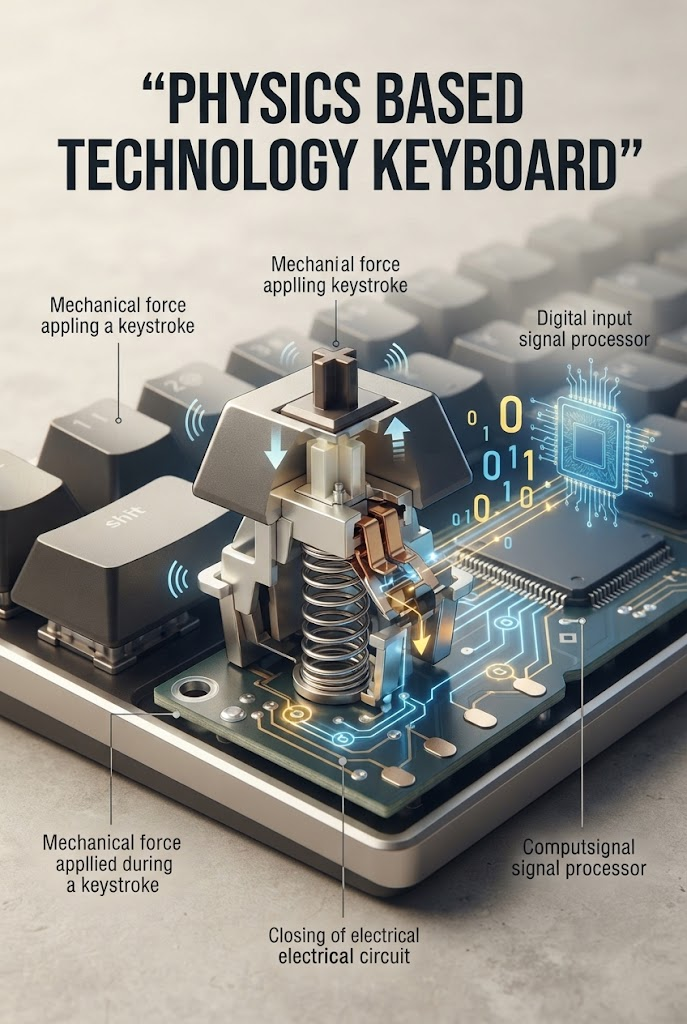
7 Amazing Facts About Physics Based Technology Keyboard Systems
Fact 1: A Key Press Is a Physical Event
Every keystroke begins with physical movement.
Your finger applies force, the key mechanism moves, and an internal sensor or contact detects the action.
This makes a keyboard an excellent everyday example of how mechanical motion can be converted into electronic information.
Fact 2: Mechanical and Membrane Keyboards Work Differently
Mechanical keyboards generally use an individual mechanical switch for each key.
Membrane keyboards commonly use flexible layers with conductive traces. Pressing a key brings parts of the circuit into contact, allowing the controller to detect the input.
Both designs perform the same basic task, but their construction, typing feel, maintenance requirements, and cost can differ considerably.
Fact 3: A Keyboard Can Detect More Than One Key at a Time
Many keyboards support simultaneous key presses.
The keyboard controller can use a key matrix to identify multiple active keys. A matrix arranges switches into rows and columns, allowing many keys to be monitored using fewer electrical connections.
However, the number of keys that can be detected reliably depends on the keyboard’s circuit design, firmware, and rollover capabilities.
Some keyboards use additional circuitry or design techniques to reduce unwanted interactions between simultaneous key presses.
Fact 4: Keyboard Controllers Help Prevent False Inputs
Mechanical contacts may produce brief electrical fluctuations when they open or close. This phenomenon is called switch bounce.
Without suitable processing, one physical key press might be interpreted as several rapid events.
Keyboard controllers commonly use debouncing techniques to filter out these unintended transitions.
The result is more reliable input detection.
Fact 5: Wireless Keyboards Depend on Communication Technology
Wireless keyboards transmit input data without a direct data cable.
Bluetooth keyboards communicate using Bluetooth technology, while other models may use dedicated wireless receivers.
Wireless keyboards also need a power source, usually a replaceable battery or rechargeable battery.
Their battery life depends on factors such as transmission behavior, electronics, lighting features, and power-management design.
Fact 6: Keyboard Design Affects Typing Comfort
Keyboard design can influence how comfortable typing feels.
Relevant factors include key travel, actuation force, key spacing, keycap shape, keyboard angle, and the overall layout.
A switch that requires more force may feel different from one that activates with a lighter touch.
However, there is no single switch design that is ideal for everyone. Comfort also depends on typing habits, hand position, work duration, and individual preferences.
Fact 7: Gaming Keyboards Use Specialized Input Features
Some gaming keyboards offer features such as high rollover, customizable key assignments, programmable macros, and adjustable lighting.
High rollover helps the keyboard register multiple simultaneous key presses, which can be useful when several controls are activated together.
Programmable features are handled by the keyboard’s firmware or supporting software.
Although lighting can improve visibility or appearance, it is not required for the keyboard’s core input function.
Types of Keyboards and Their Differences
Different keyboards use different technologies to detect key presses.
| Keyboard Type | Main Working Principle | Key Feature |
|---|---|---|
| Mechanical keyboard | Individual mechanical switches | Distinct switch feel and replaceable switch options on some models |
| Membrane keyboard | Pressure brings conductive layers together | Commonly used in affordable keyboards |
| Scissor-switch keyboard | Short-travel mechanism with a stabilizing structure | Frequently found in laptop keyboards |
| Capacitive keyboard | Detects changes in capacitance | Uses electrical-field changes to identify input |
| Optical keyboard | Detects changes in a light path | Uses optical sensing in the switch mechanism |
| Wireless keyboard | Sends input data through a wireless connection | Allows cable-free use |
These categories describe different aspects of keyboard design. For example, a keyboard can use mechanical switches and still be wireless.
The best choice depends on your budget, intended use, preferred typing feel, noise tolerance, and portability requirements.
Wired vs. Wireless Keyboards
Both wired and wireless keyboards allow users to enter information, but their connection methods differ.
| Feature | Wired Keyboard | Wireless Keyboard |
|---|---|---|
| Connection | Physical cable | Bluetooth or another wireless technology |
| Power | Commonly supplied through USB | Usually requires a battery or rechargeable power source |
| Portability | Limited by cable length | Greater freedom of movement |
| Setup | Often simple plug-and-play | May require pairing or a receiver |
| Cable management | Requires managing a cable | Reduces cable clutter |
| Latency | Depends on device and connection | Depends on wireless technology and implementation |
Neither category is automatically better in every situation.
A wired keyboard may be convenient for a permanent desktop setup, while a wireless model may be preferable for portable devices or a cleaner workspace.
How to Choose the Right Keyboard
Understanding keyboard technology can help you select a model that suits your needs.
1. Consider Your Main Purpose
For everyday typing, studying, and office work, a simple membrane or mechanical keyboard may be sufficient.
For gaming or specialized workflows, features such as simultaneous key detection, programmable controls, and adjustable actuation may be useful.
2. Check the Typing Feel
Mechanical switches can differ in their force requirements, sound, and feedback.
Try different switch types if possible before purchasing a keyboard, especially if you type for several hours each day.
3. Consider Noise
Some mechanical switches produce noticeable clicking sounds, while others are designed to be quieter.
Membrane keyboards are often relatively quiet, but actual noise levels depend on the specific product.
For shared study spaces, libraries, or offices, quieter models may be more suitable.
4. Decide Between Wired and Wireless
Choose a wired model if you prefer a direct connection without a separate keyboard battery.
Choose a wireless model if flexibility and fewer cables are more important.
Before buying a wireless keyboard, check its battery life, supported connection methods, and compatibility with your device.
5. Look at Durability and Maintenance
Keyboard durability depends on switch design, material quality, construction, and usage.
Some mechanical keyboards allow individual switches or keycaps to be replaced. Other designs may be more difficult to repair.
Also consider spill resistance, cleaning requirements, and warranty coverage.
Common Keyboard Problems Explained by Physics
Some keyboard problems can be understood through basic mechanical and electrical principles.
Why Does a Key Sometimes Repeat?
A key may repeat because of switch behavior, software settings, debris, or an electrical or mechanical fault.
The operating system may also have a key-repeat setting that controls how quickly a held key produces repeated input.
Why Do Some Keys Stop Working?
A key may fail because of a damaged switch, a broken conductive trace, contamination, a loose connection, or a controller issue.
The exact cause depends on the keyboard’s construction.
Why Does a Mechanical Keyboard Make Noise?
Noise can come from the switch mechanism, the keycap striking the keyboard housing, the spring, or the keyboard vibrating against the desk.
Different switches and keyboard structures produce different sound profiles.
Why Can Some Keyboards Miss Simultaneous Key Presses?
The keyboard’s matrix design and rollover capability determine how it handles multiple keys pressed at once.
Some designs have limitations that can prevent every simultaneous input from being registered correctly.
A keyboard with suitable rollover support can reduce this problem.
The Future of Keyboard Technology
Keyboard technology continues to evolve as manufacturers improve input mechanisms, materials, connectivity, and customization.
Hall Effect Keyboards
Some keyboards use magnetic sensors to detect key position.
These designs can measure changes in a magnetic field as a key moves. Depending on the implementation, this can support adjustable actuation points and other specialized features.
Improved Wireless Connectivity
Advances in wireless communication and power management may help improve reliability and battery life.
The actual performance depends on the keyboard hardware, protocol, environment, and connected device.
Customizable Input Systems
Programmable keyboards allow users to customize key assignments, shortcuts, and macros.
These features can improve workflow efficiency for programmers, content creators, gamers, and other users.
Ergonomic Designs
Split keyboards, alternative layouts, adjustable tenting, and other ergonomic designs aim to make typing more comfortable for different users.
Comfort still depends on individual needs, posture, and usage habits.
New Materials and Switch Designs
Manufacturers continue to experiment with different switch mechanisms, keycap materials, and keyboard structures.
The goal is often to improve durability, typing feel, noise control, and manufacturing efficiency.
Despite these developments, the basic purpose remains unchanged: detecting physical input and translating it into information that digital devices can process.
Frequently Asked Questions
1. What is the working principle of a keyboard?
A keyboard detects a key press using a mechanical, electrical, capacitive, or optical mechanism. Its controller processes the detected input and sends data to the connected computer.
2. Which physics principles are used in keyboard technology?
Keyboard technology can involve mechanical force, spring behavior, electrical circuits, capacitance, optics, and digital electronics.
3. How does a mechanical keyboard work?
A mechanical keyboard uses individual switches beneath its keys. Pressing a key moves the switch mechanism and changes the electrical state detected by the keyboard controller.
4. What is the difference between a mechanical and a membrane keyboard?
Mechanical keyboards typically use individual mechanical switches, while membrane keyboards generally detect key presses through pressure-sensitive conductive layers.
5. How does a wireless keyboard communicate with a computer?
A wireless keyboard sends input data through Bluetooth or another wireless connection. The receiving device processes that data and passes the key events to the operating system.
6. Why are keyboard switches different?
Switches can differ in actuation force, travel distance, feedback, sound, and construction. These differences affect typing feel and suitability for different activities.
7. What is keyboard rollover?
Keyboard rollover describes how many simultaneous key presses a keyboard can register correctly. The supported number depends on the keyboard’s circuit design and controller.
Final Thoughts
The physics based technology keyboard is an excellent example of how mechanical movement and electronic systems work together in modern computing.
When you press a key, a physical mechanism changes state. The keyboard detects that change, processes the input through its controller, and transmits digital data to the computer.
Mechanical switches, membrane layers, capacitive sensors, optical mechanisms, and wireless communication all demonstrate different ways of connecting physical actions with digital information.
Understanding these principles makes keyboard technology easier to appreciate and helps users choose devices that fit their needs.
From everyday typing to gaming and professional work, keyboards remain essential interfaces between humans and computers.
Want to explore more science and technology explained in simple language? Visit MindHiveNest for educational articles about physics, electronic devices, and the technology we use every day.