
Introduction
Have you ever wondered how a computer mouse can detect even the smallest movement of your hand and move a pointer across a screen? How does a wireless mouse communicate with a computer without a cable? The answer lies in the fascinating combination of physics, optics, electronics, and digital technology.
A physics based technology mouse uses scientific principles to detect movement and convert physical actions into digital commands. Modern computer mice may use optical sensors, light-emitting diodes, image processing, electronic circuits, and wireless communication to provide accurate and responsive control.
From ordinary office computers to gaming systems, graphic design workstations, and scientific applications, the computer mouse remains one of the most widely used input devices.
Understanding the physics behind a computer mouse helps us discover how light, motion, electronic signals, and digital processing work together to control what we see on a screen.
In this article, we will explore how a computer mouse works, the science behind optical sensors, the role of physics in movement detection, and seven amazing facts about modern mouse technology.
What Is a Physics-Based Technology Mouse?
A computer mouse is an input device that allows users to control a pointer, select objects, click buttons, scroll through documents, and interact with computer software.
Traditional mechanical mice used a physical ball to detect movement. As the user moved the mouse, the ball rotated and transferred motion to internal rollers. Sensors then converted that mechanical movement into signals that the computer could interpret.
Modern computer mice usually use optical or laser-based sensing systems instead of a mechanical ball.
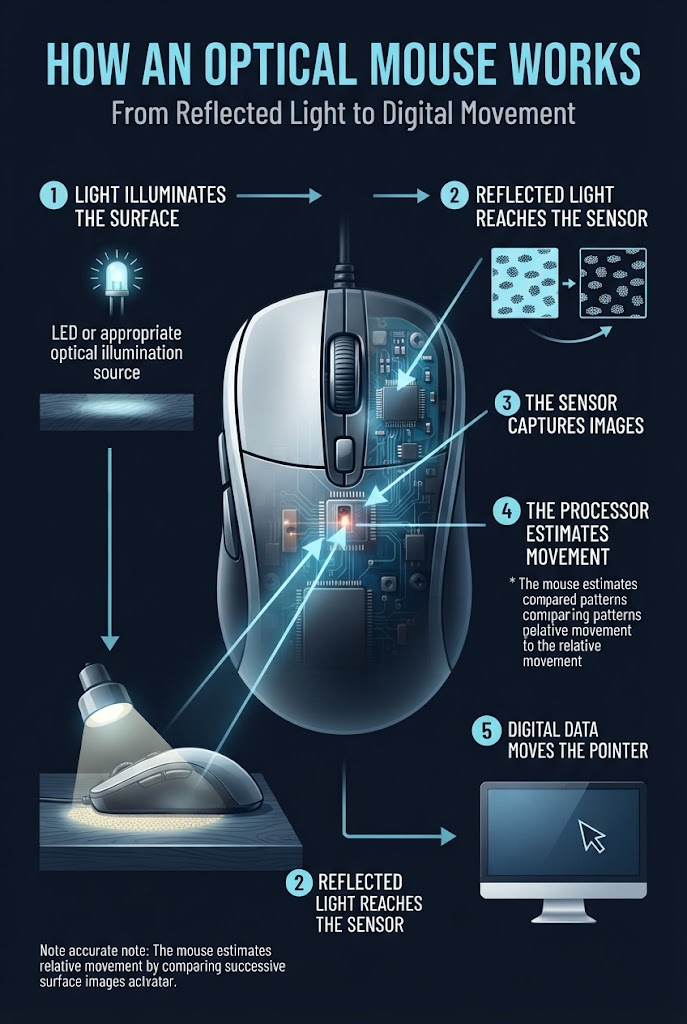
An optical mouse illuminates the surface beneath it and captures successive images of the surface using a small image sensor. An internal processor compares these images to estimate the direction and amount of movement.
The mouse converts this information into digital signals and sends them to the computer through a USB cable or a supported wireless connection.
This combination of light, motion detection, and electronic processing makes modern mouse technology an excellent example of physics applied to everyday life.
How Does a Computer Mouse Work?
The working process of a modern optical mouse involves several important stages.
1. Light Illuminates the Surface
Inside an optical mouse, a light source—commonly a light-emitting diode (LED)—illuminates the surface beneath the device.
The light reflects from the surface and returns toward the mouse’s optical sensor.
The design of the illumination system helps the sensor capture surface details that can be used to detect movement.
Some mice use different optical arrangements, and not every mouse uses the same type of light source.
2. The Optical Sensor Captures Images
A small image sensor captures successive images of the illuminated surface.
These images contain tiny surface details, such as texture patterns and irregularities. The sensor does not need to recognize the object or identify the surface in the way a human does.
Instead, it captures enough visual information for the mouse’s internal processor to compare one image with another.
3. The Processor Detects Movement
The mouse’s digital signal processor or related processing circuitry compares successive images to estimate how the surface has moved relative to the sensor.
For example, if the mouse moves to the right, the observed surface pattern shifts in the opposite direction relative to the sensor.
The processor analyzes these changes to estimate movement along two axes.
This is an example of motion estimation through image processing.
4. Movement Becomes Digital Information
The mouse converts its movement estimates into digital data.
It also detects button presses and, when available, scroll-wheel movement.
The device organizes this information according to its communication protocol and sends it to the connected computer.
5. The Computer Moves the Pointer
The computer receives the mouse’s movement data and updates the pointer’s position on the screen.
The distance the pointer moves depends on the mouse’s reported movement, operating-system settings, pointer acceleration, and other configuration choices.
The entire process happens rapidly, allowing users to move the pointer and interact with software naturally.
The Physics Behind Computer Mouse Technology
Several branches of physics contribute to the operation of a modern mouse.
1. Optics and Light Reflection
Optics is the study of light and its interactions with materials.
In an optical mouse, light illuminates the surface beneath the device. Some of that light reflects from the surface and reaches the image sensor.
The amount and direction of reflected light depend on the surface’s texture, material, angle, and optical properties.
The sensor uses the resulting image patterns to help the processor estimate movement.
A mouse generally performs better on surfaces that provide suitable visual detail. Very smooth, transparent, highly reflective, or otherwise challenging surfaces may make movement detection less reliable for some sensors.
This demonstrates how the behaviour of light affects the performance of everyday electronic devices.
2. Motion Detection and Relative Movement
A computer mouse measures its movement relative to the surface beneath it.
When the mouse moves, the surface appears to shift in the opposite direction within the sensor’s images.
The processor compares these image patterns to estimate the displacement between successive observations.
For example, when the mouse moves horizontally, the image-processing system detects a corresponding shift in the captured surface pattern.
This is not the same as measuring absolute geographical position. A conventional mouse generally estimates relative movement rather than determining its exact location in the room.
The principle allows the computer to translate physical hand movement into pointer movement.
3. Electronic Circuits and Digital Signals
A modern mouse contains electronic circuits that control its light source, sensor, processor, buttons, and communication interface.
When a user presses a button, an electrical switch changes state. The mouse’s circuitry detects that change and encodes it into information that can be sent to the computer.
Similarly, movement estimates from the optical sensor are converted into digital data.
The computer receives these signals and interprets them as pointer movement, clicking, scrolling, or other supported actions.
Without electronic circuits and digital processing, the mouse could not reliably communicate the user’s actions to a computer.
4. Electromagnetism and Wireless Communication
Wireless mice use radio communication to send information to a computer.
Many wireless models communicate through a small USB receiver, while others can connect using Bluetooth.
The mouse’s electronic circuitry prepares digital information for transmission. A radio transmitter converts that information into a suitable radio signal, and a receiving device processes the incoming signal.
Bluetooth and proprietary wireless connections use different communication protocols, so compatibility depends on the mouse and computer.
Wireless communication allows the mouse to operate without a physical data cable, although the device still needs a power source such as a battery or rechargeable cell.
5. Mechanical Physics in Buttons and Scroll Wheels
Although optical sensing is electronic, a mouse also relies on mechanical components.
Mouse buttons use switches that respond to physical pressure. Depending on the design, the mechanism may include a flexible structure, a spring-like element, or a microswitch.
When the user presses a button, the mechanical movement changes the state of the switch.
A scroll wheel also converts physical rotation into detectable input. Many designs use an encoder or related sensing mechanism to detect wheel movement.
These components demonstrate how force, motion, rotation, and mechanical design work alongside electronics in a computer mouse.
7 Amazing Facts About Physics Based Technology Mouse
Fact 1: Modern Optical Mice Usually Do Not Need a Moving Ball
Older mechanical mice used a ball that rolled against the surface.
The ball transferred movement to internal rollers, which helped the mouse determine its direction and displacement.
Modern optical mice generally use light, an image sensor, and image-processing algorithms instead.
This design eliminates the traditional tracking ball and reduces the need to clean the mechanical tracking mechanism.
Fact 2: An Optical Mouse Uses Surface Details to Detect Movement
An optical mouse does not simply detect whether light is present.
Its sensor captures images of the surface, and the processing circuitry compares successive images to estimate movement.
Tiny texture differences help the system calculate how far the mouse has moved.
This is why certain surfaces work better than others. A surface with useful optical detail may provide more reliable tracking than a transparent or highly reflective one.
Fact 3: Mouse DPI Affects Pointer Sensitivity
DPI stands for dots per inch. In the mouse industry, it is commonly used to describe how many counts the mouse reports for a given distance of physical movement.
A higher DPI setting generally means the mouse reports more movement counts for the same physical distance.
For example, increasing the DPI setting can cause the pointer to travel farther across the screen when the user moves the mouse the same distance.
However, higher DPI does not automatically mean better accuracy. Sensor quality, tracking stability, surface compatibility, software settings, and user preference also matter.
Fact 4: Gaming Mice Can Report Movement Frequently
Many gaming mice offer high polling rates, which describe how frequently the device reports input to the computer.
A mouse operating at a polling rate of 1,000 Hz can report input at intervals of approximately one millisecond under suitable operating conditions.
Higher polling rates may reduce the time between reports, but the practical benefit depends on the computer, game, display, sensor implementation, and user.
A higher polling rate can also increase processing and power demands in some situations.
Fact 5: Wireless Mice Need Efficient Power Management
A wireless mouse usually operates using a battery or rechargeable cell.
Its electronic circuits must balance tracking performance, communication frequency, responsiveness, and energy consumption.
Power-saving features may reduce activity when the mouse is not moving or when it enters a sleep state.
Battery life depends on factors such as sensor operation, wireless technology, lighting effects, polling rate, battery capacity, and usage patterns.
Fact 6: A Mouse Can Detect Movement Without Understanding the Surface
A conventional optical mouse generally does not need to recognize whether it is moving across a desk, mouse pad, or another surface.
Instead, its sensor and processing system analyze visual patterns to estimate relative movement.
The system is designed to detect displacement, not to understand the meaning of the objects visible in its images.
This makes the technology different from a camera system designed for object recognition or general-purpose computer vision.
Fact 7: Different Mouse Sensors Suit Different Applications
A basic office mouse may prioritize affordability, comfort, and reliable everyday tracking.
A gaming mouse may emphasize low latency, adjustable sensitivity, high polling rates, and consistent tracking during rapid movement.
A specialist mouse for design or productivity may include additional buttons, ergonomic features, or a scroll wheel designed for particular workflows.
The best mouse depends on the user’s needs rather than one specification alone.
Optical Mouse vs Laser Mouse
Optical and laser mice use light-based sensing, but their illumination systems and implementations may differ.
| Feature | Optical Mouse | Laser Mouse |
|---|---|---|
| Illumination | Commonly uses an LED | Uses a laser-based light source |
| Tracking method | Uses an optical sensor and image processing | Also uses optical sensing and image processing |
| Surface performance | Depends on the sensor and surface | Depends on the sensor and surface |
| Typical applications | Office work, study, and gaming | Office work, gaming, and other applications |
| Accuracy | Depends on sensor quality and implementation | Depends on sensor quality and implementation |
| Best choice | A suitable model for the user’s surface and needs | A suitable model for the user’s surface and needs |
A laser mouse is not automatically more accurate than every optical mouse. Actual tracking performance depends on the complete sensor design, firmware, surface, and operating conditions.
What Is DPI in a Computer Mouse?
DPI is one of the most commonly discussed mouse specifications.
In practical use, mouse DPI describes how many movement counts the mouse reports for a given distance travelled across a surface.
A higher DPI setting generally makes the pointer move farther for the same physical mouse movement, assuming other settings remain unchanged.
For example, a user who needs to move the pointer across a large display with small hand movements may prefer a higher sensitivity setting. Someone who needs fine control may prefer a lower setting.
However, DPI should not be confused with every aspect of sensor accuracy. Tracking consistency, latency, surface compatibility, and software configuration also influence the overall experience.
The ideal setting depends on the task and the user’s preferences.
What Affects Computer Mouse Accuracy?
Several factors determine how accurately a mouse tracks movement.
1. Surface Quality
A sensor needs suitable visual information to estimate movement. Some transparent, glossy, or highly reflective surfaces can make tracking more difficult.
2. Sensor Design
The image sensor, optics, processing hardware, and firmware all contribute to tracking performance.
3. DPI and Sensitivity Settings
Sensitivity determines how physical movement translates into pointer movement. An inappropriate setting may make precise control more difficult.
4. Polling Rate and Latency
The polling rate affects how frequently the mouse reports input. Latency also depends on internal processing, communication, operating-system behaviour, and application design.
5. Physical Condition
Dust, damage, or obstruction around the sensor opening can affect tracking. Cleaning the mouse according to the manufacturer’s instructions may help.
Understanding these factors makes it easier to choose and use a mouse effectively.
Common Problems With Computer Mouse Technology
Even a well-designed mouse can sometimes develop problems.
The pointer moves irregularly: Try a different suitable surface, check the sensor opening for dirt, and inspect the mouse settings.
The mouse does not respond: Check the USB connection, wireless receiver, battery level, or Bluetooth connection.
Wireless movement feels delayed: Reduce unnecessary distance and obstacles, check battery status, and investigate possible wireless interference.
The pointer moves too quickly: Lower the mouse’s DPI setting or adjust pointer sensitivity in the operating system.
Mouse clicks do not register: Check the software settings and connection. If the switch is physically damaged, repair or replacement may be necessary.
These simple checks can help identify common issues before replacing the device.
The Future of Computer Mouse Technology
Computer mouse technology continues to evolve alongside gaming, productivity, accessibility, and human-computer interaction.
Future developments may include more efficient optical sensors, improved wireless performance, lighter designs, better power management, and more customizable controls.
Ergonomic designs may also help users select devices that better suit their hand size, grip style, and working habits.
In addition, alternative input devices such as trackballs, touchpads, styluses, and gesture-based systems provide different ways to interact with computers.
Although the mouse is a relatively small device, its operation demonstrates the practical combination of optics, mechanics, electronics, and computing.
Frequently Asked Questions (FAQs)
1. What is a physics based technology mouse?
A physics based technology mouse is a computer input device that uses principles such as optics, motion detection, mechanical movement, electronics, and wireless communication to translate physical actions into digital commands.
2. How does an optical mouse work?
An optical mouse illuminates the surface beneath it and captures successive images with an optical sensor. Its processor compares the images to estimate movement and sends the resulting data to the computer.
3. What is the difference between an optical mouse and a laser mouse?
Both use optical sensing to detect movement. They differ primarily in their illumination systems and implementations. Their actual performance depends on the sensor design and the surface being used.
4. What does DPI mean in a mouse?
DPI stands for dots per inch. In common mouse specifications, it describes the number of movement counts reported for a given distance. A higher setting generally makes the pointer move farther for the same physical movement.
5. Does a wireless mouse use Bluetooth?
Some wireless mice use Bluetooth, while others use a proprietary wireless connection and a dedicated USB receiver. The connection method depends on the specific model.
6. Why does my optical mouse not work on some surfaces?
Some surfaces provide insufficient or unsuitable visual details for reliable optical tracking. Transparent, highly reflective, or glossy surfaces can cause problems for certain sensors.
7. Is a higher-DPI mouse always better?
No. A higher DPI setting increases sensitivity, but it does not automatically guarantee better accuracy. Sensor quality, tracking consistency, latency, and personal preference also matter.
Conclusion
A computer mouse is much more than a simple pointing device. It is a practical example of physics and engineering working together to make digital interaction possible.
Optical sensors use reflected light to capture surface details, image-processing systems estimate movement, electronic circuits convert actions into digital information, and wired or wireless connections transfer that information to a computer.
From ordinary office work to advanced gaming and professional design, mouse technology demonstrates how scientific principles can become useful everyday tools.
By understanding the physics behind a computer mouse, we gain a clearer picture of the technology that connects our physical movements with the digital world.
Explore more science and technology articles on MindHiveNest to discover how physics powers the devices we use every day.